tikoci.github.io/restraml — schema downloads, side-by-side version diffs, an interactive API explorer, a command lookup tool, and a browser-based
/appYAML editor for the MikroTik RouterOS REST API. No install needed, runs in your browser.For RouterOS 7.22+: JSON Schema files for
/appcontainer YAML are also published there, ready to plug into VSCode — setup details below.
Auto-generated API schemas for the MikroTik RouterOS REST API, built automatically by GitHub Actions — you can watch the sausage being made.
Pre-built schema files for the RouterOS REST API are available at https://tikoci.github.io/restraml/
Tip
Missing a version? Need a feature? Spot a bug? Open an issue — builds run automatically for new RouterOS releases via GitHub Actions, and requests are welcome.
Each RouterOS version includes:
- RAML — RAML 1.0 schema, usable in Postman, MuleSoft, and other API tools
- OpenAPI 3 — OpenAPI 3.0 schema where
openapi.jsonhas been generated, viewable in the API Explorer with enriched descriptions from MikroTik documentation - JSON — raw
/console/inspectoutput from RouterOS, useful for data analysis and diffs - MIB — link to the official MikroTik MIB for SNMP
There may be a base and +extra download for each version:
- base — just the
routeros.npksystem package - +extra — all x86 packages:
routeros,dude,container,rose-storage,gps,lora,calea,user-manager,ups,iot,wifiwave2,tr069-client
An interactive API explorer at tikoci.github.io/restraml/openapi.html lets you browse the RouterOS REST API using the OpenAPI 3 schema. Powered by Scalar, it provides endpoint documentation enriched with descriptions from MikroTik's official documentation, request/response examples, and a built-in HTTP client for testing.
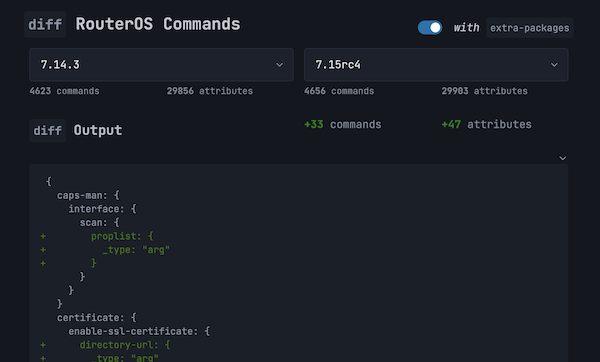
The project website includes a diff tool that compares the /console/inspect output between any two RouterOS versions — useful for tracking new commands, removed attributes, and API changes across releases.
A command lookup tool at tikoci.github.io/restraml/lookup.html lets you search RouterOS commands and attributes across versions, with filtering by path and attribute name.
A browser-based YAML editor at tikoci.github.io/restraml/tikapp.html lets you write and validate RouterOS /app YAML directly in your browser using Monaco editor (the same editor that powers VS Code). Features include:
- Schema validation against any versioned schema (7.22+) or the latest schema
- Built-in examples from MikroTik's app library, filterable by category
- Dirty-state tracking — edit examples safely with Stash / Recall / Discard workflow
app-store-urls=toggle that auto-converts single app ↔ array format- Custom YAML autosaved to browser local storage (restored on reload)
- Support for both single
/appdefinitions andapp-store-urls=array format - Download as
.tikapp.yaml/.tikappstore.yaml, or copy YAML to clipboard - Copy directly as a RouterOS
/app add yaml=command - Shareable URLs — version, schema mode, and YAML content encoded on explicit Share
RouterOS 7.22+ includes /app — a YAML format (similar to docker-compose but RouterOS-specific) for defining custom container applications. This project provides JSON Schema files to validate /app YAML in editors like VSCode.
| Schema | URL | Purpose |
|---|---|---|
Single /app |
routeros-app-yaml-schema.latest.json |
Validates a single /app YAML definition |
| App Store | routeros-app-yaml-store-schema.latest.json |
Validates the array format used by /app/settings's app-store-urls= |
| Per-version | https://tikoci.github.io/restraml/{version}/routeros-app-yaml-schema.json |
Version-specific schema (available for 7.22+) |
Per-version schemas are automatically validated against MikroTik's built-in /app entries for each new RouterOS release to verify accuracy.
Note
Each schema build boots a RouterOS CHR in QEMU directly on a GitHub Actions runner (with KVM acceleration), installs extra packages, then validates all ~80 built-in /app YAMLs from the live router against the schema. See appyamlschemas.yaml for the workflow.
Install the Red Hat YAML extension for VSCode, then use either approach:
Add a yaml-language-server comment at the top of your YAML file. The YAML extension will detect it automatically — no settings changes needed.
For a single /app definition:
# yaml-language-server: $schema=https://tikoci.github.io/restraml/routeros-app-yaml-schema.latest.json

name: my-app
descr: My custom RouterOS app
services:
  server:
    image: myimage:latest
    ports:
      - 8080:80:web
For an app store file (array of /app definitions, used with app-store-urls=):
# yaml-language-server: $schema=https://tikoci.github.io/restraml/routeros-app-yaml-store-schema.latest.json

- name: app-one
  services:
    server:
      image: app1:latest
- name: app-two
  services:
    server:
image: app2:latestAdd to your .vscode/settings.json to apply the schema automatically to any file whose name matches the glob pattern. Files must be named using the configured ending (e.g. my-app.tikapp.yaml for a single /app definition, or my-store.tikappstore.yaml for a store file):
{
  "yaml.schemas": {
    "https://tikoci.github.io/restraml/routeros-app-yaml-schema.latest.json": "*.tikapp.yaml",
    "https://tikoci.github.io/restraml/routeros-app-yaml-store-schema.latest.json": "*.tikappstore.yaml"
  }
}
Tip
You can also use a version-specific schema URL (e.g., .../7.22/routeros-app-yaml-schema.json) if you need validation matched to a particular RouterOS release.
The RAML 1.0 schema can be imported into Postman (download here) to explore the RouterOS REST API:
- Copy the URL of the version-specific RAML file from the Schema Downloads table (right-click the base or +extra link under RAML)
- In Postman, go to File → Import and paste the URL
- On the next screen, select Postman Collection — note this may take several minutes for the full schema
Warning
The generated schema is more for convenience than strict validation. Generation is limited to the data available from /console/inspect. For example, all parameters are marked as optional in the schema even though some are required in practice.
restraml/
├── rest2raml.js              # Main script: RouterOS REST API → RAML 1.0
├── validraml.cjs             # RAML 1.0 validator
├── appyamlvalidate.js        # /app YAML schema validator (Bun)
├── deep-inspect.ts           # Deep API tree inspection (Bun)
├── ros-api-protocol.ts       # Vendored RouterOS native API wire protocol
├── enrich-openapi.ts         # Enriches OpenAPI schemas with descriptions
├── validate-openapi.ts       # OpenAPI 3.0 schema validator
├── validate-workflows.mjs    # Runs actionlint over .github/workflows/
├── *.test.ts                 # Unit + integration tests (bun test)
├── Dockerfile.chr-qemu       # Local dev: RouterOS CHR in QEMU via Docker
├── BACKLOG.md                # Actionable queue for future work
├── scripts/
│   ├── entrypoint.sh         # QEMU launcher for local Docker use
│   ├── deep-inspect-multi-arch.ts  # Per-arch deep-inspect orchestrator
│   ├── diff-deep-inspect.ts  # Diff two per-arch deep-inspect outputs
│   ├── build-docs-index.mjs  # Generate docs/docs-index.json
│   ├── test-with-qemu.sh     # Integration tests (deep-inspect) against local CHR
│   ├── test-ros-api.sh       # Integration + stress tests (ros-api-protocol) against local CHR
│   ├── benchmark-qemu.sh     # REST vs native API benchmark suite against local CHR
│   └── native-api-investigation/   # Archived native API non-determinism research scripts
├── docs/                     # GitHub Pages root (one subdirectory per version)
│   ├── index.html            # Main website: version list, diff tool, downloads
│   ├── openapi.html          # Interactive API Explorer (Scalar-based)
│   ├── lookup.html           # Command search tool
│   ├── diff.html             # Schema diff tool
│   ├── tikapp.html           # /app YAML editor (Monaco-based)
│   ├── tikapp-manual.html    # /app YAML editor user manual
│   ├── restraml-shared.js    # Shared JS utilities for all docs/*.html pages
│   ├── restraml-shared.css   # Shared CSS for all docs/*.html pages
│   ├── deep-inspect.md       # Deep-inspect design/history reference
│   ├── mikrotik-bug-native-api-inspect.md  # Native API completion bug report
│   ├── deep-inspect.schema.json
│   ├── deep-inspect.future.schema.json
│   ├── docs-index.json       # Published inventory for static version discovery
│   ├── routeros-app-yaml-schema.latest.json
│   ├── routeros-app-yaml-schema.editor.json
│   ├── routeros-app-yaml-store-schema.latest.json
│   ├── routeros-app-yaml-store-schema.editor.json
│   └── {version}/            # Per-version schemas (RAML, OpenAPI 3, inspect JSON)
├── CLAUDE.md                 # Full architecture guide for AI agents
├── AGENTS.md                 # GitHub Copilot agent instructions
└── .github/
    ├── actions/publish-with-retry/  # Composite action: retrying publish to main
    └── workflows/
        ├── auto.yaml         # Daily cron: detect new versions, trigger builds
        ├── manual-using-docker-in-docker.yaml
        ├── manual-using-extra-docker-in-docker.yaml
        ├── appyamlschemas.yaml   # Validate and publish /app YAML schemas
        ├── deep-inspect-multi-arch.yaml
        ├── manual-from-secrets.yaml
        ├── codeql.yml        # Code scanning (JS/TS + Actions)
        └── dependency-review.yml  # PR dependency review
For full architecture details, CI/CD pipeline documentation, and development instructions, see:
- CLAUDE.md — comprehensive architecture guide
- AGENTS.md — GitHub Copilot agent instructions
- BACKLOG.md — ready-to-go tasks and policy decisions still needed