Open source tools for working with MikroTik RouterOS — VS Code extensions for syntax intelligence and notebooks, TypeScript libraries for API access and automation, and benchmarking for AI agent strategies.
VS Code Extensions
If you write RouterOS scripts or work with RouterOS configuration from a computer, these extensions are worth trying. Install RouterOS LSP for syntax checking and completions in any .rsc file, then add TikBook for a full notebook and tooling experience. Both are free, open source, and on the VS Code Marketplace.
lsp-routeros-ts — Language Server Protocol for MikroTik RouterOS
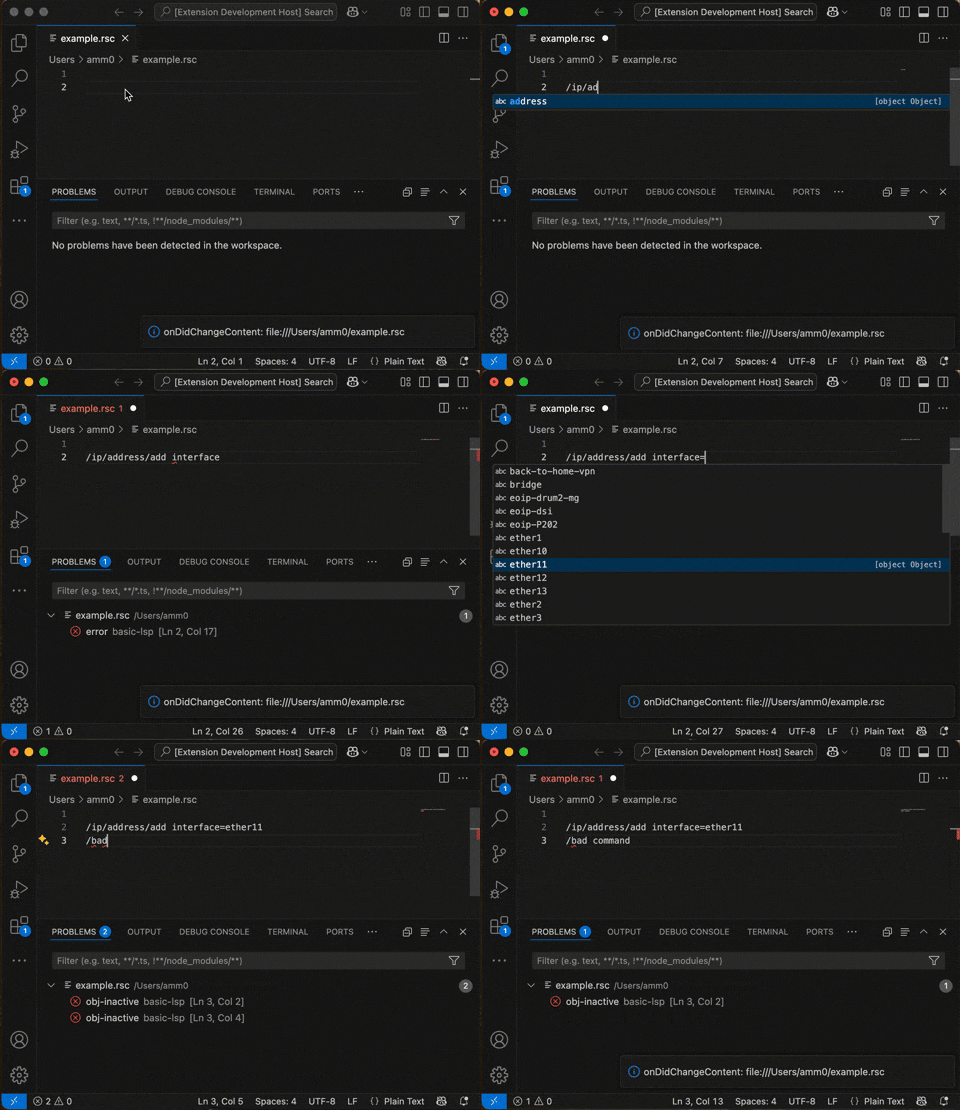
RouterOS LSP is a language server that provides syntax highlighting, code completion, real-time diagnostics, and other intelligent editor features for RouterOS scripts (.rsc files) in VS Code, NeoVim, and any LSP-capable editor. By connecting to a live RouterOS device via the REST API, the LSP knows what commands and arguments are valid for your specific RouterOS version — it always stays current, even after a router upgrade.
RouterOS LSP providing code completions in VS Code
Supported Features
Completion — tab completion and code suggestions, scoped to your RouterOS version
Diagnostics — real-time syntax error reporting as you type
Semantic Tokens — syntax highlighting that matches the RouterOS CLI color scheme
Hover Information — variable inspection and inline help (work in progress)
Definition Lookup — jump to definitions within a script
VSCode Walkthrough — guided setup wizard on first install
Alternatively, search TIKOCI in the VS Code Extensions panel (Ctrl+Shift+X / ⌘+Shift+X) and select RouterOS LSP.
Setup — connecting to your RouterOS device
RouterOS LSP requires a live RouterOS device accessible via the REST API. By default, RouterOS’s www service runs on port 80 and is reachable from the LAN — so a standard router with default configuration works out of the box using http:// and the admin account.
Open VS Code Settings (Ctrl+, / ⌘+,) and go to Extensions → RouterOS LSP
Set Base URL — e.g. http://192.168.88.1 or https://router.lan
Set Username and Password for a RouterOS account with read, api, rest-api policy
For production routers, HTTPS with a Let’s Encrypt certificate is recommended:
vscode-tikbook — Notebook and Tools for MikroTik RouterOS in VS Code
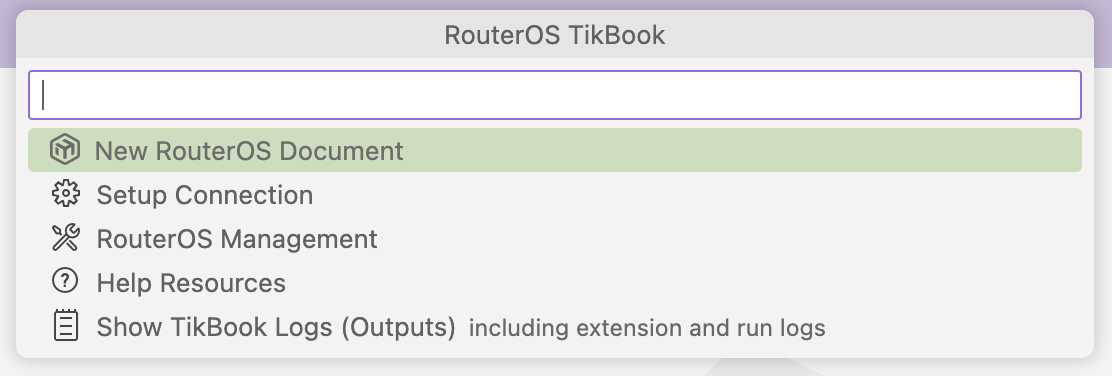
TikBook is a companion extension to RouterOS LSP, akin to a “plus pack” for VS Code specifically. Installing TikBook automatically brings in RouterOS LSP if it is not already present. TikBook adds a notebook interface for RouterOS scripts, virtual configuration views, CSV exports, JSON converters, and a “Quick Commander” menu — all wired to your live RouterOS device.
TikBook’s Quick Commander menu — access notebooks, management, and help in one place
What TikBook Adds
RouterOS Notebook — Jupyter-style notebook for RouterOS, stored as plain .rsc or .md files
RouterOS Run in Markdown — run ```routeros code blocks directly from any .md file
Quick Commander — hierarchical menu (Alt+Shift+M) for new documents, SSH, WebFig, CSV exports, and more
CSV Views — export any /print command as a CSV, rendered as a table in VS Code
JSON → RouterOS Array — context-menu converter to turn JSON into RouterOS array syntax
GitHub Copilot support — with Copilot installed, a “Generate” option appears inside notebook cells; deeper Copilot integration is in the works
The TikBook notebook toolbar — run cells, manage sections, and navigate errors
Packages WinBox 4.0 as a .deb for Linux, with a desktop icon. Provided as a template for packaging WinBox on various Linux distributions, rather than for wide redistribution.
Modern multi-protocol RouterOS API library for TypeScript. Provides a unified interface across RouterOS’s multiple API protocols — REST, WebSocket, and the binary API — plus a ready-to-run CLI for scripting and automation without writing any setup code.
Experimental TypeScript library and CLI for MikroTik The Dude — the network monitoring and management application from MikroTik. Provides programmatic access to The Dude’s SQLite database (dude.db) for reading device topology, monitoring history, and network maps.
Benchmarks RouterOS AI agent-support strategies across MCPs, skills, and retrieval methods. Useful for comparing how well different AI tooling configurations handle RouterOS tasks, measuring quality and latency across approaches like rosetta MCP and routeros-skills.